

# HTTP Gateway (optional)
As part of the Airnode deployment you can decide to deploy an HTTP Gateway. The gateway allows the testing of defined Airnode endpoints without accessing the blockchain. You provide endpoint arguments directly to the Airnode with a tool. of your choice and get a response from an integrated API operation. This results in confirmation your integration is set up properly. The HTTP gateway feature is available when deploying to both the AWS and GCP cloud providers.
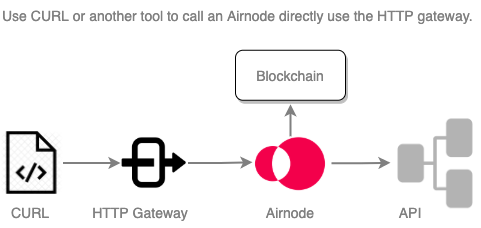
# Setup
Enable the HTTP gateway by setting two fields in the config.json
(nodeSettings.httpGateway).
- enabled: A boolean setting enable/disable for the Airnode's HTTP gateway.
- apiKey: A user defined API key to authenticate against the gateway. The key must have a length of between 30 - 120 characters.
"nodeSettings": {
  "cloudProvider": {
    "type": "aws",
    "region": "us-east-1"
  },
  "airnodeWalletMnemonic": "${AIRNODE_WALLET_MNEMONIC}",
  "heartbeat": {...},
  "httpGateway": {
    "enabled": true,
    "apiKey": "${HTTP_GATEWAY_API_KEY}"
  },
  ...
},
2
3
4
5
6
7
8
9
10
11
12
13
You must also add each endpoint to test in the triggers.http[n] array. The
rrp field serves its endpoints on-chain. The http field serves its endpoints
via the HTTP gateway. It may be desirable to serve some or all endpoints
on-chain and only some via the gateway, or vise versa.
// in config.json
"triggers": {
  "rrp": [
    {
      "endpointId": "0x6db9e3e3d073ad12b66d28dd85bcf49f58577270b1cc2d48a43c7025f5c27af6",
      "oisTitle": "CoinGecko Basic Request",
      "endpointName": "coinMarketData",
    }
  ],
  "http": [
    {
      "endpointId": "0x6db9e3e3d073ad12b66d28dd85bcf49f58577270b1cc2d48a43c7025f5c27af6",
      "oisTitle": "CoinGecko Basic Request",
      "endpointName": "coinMarketData",
    }
  ]
}
2
3
4
5
6
7
8
9
10
11
12
13
14
15
16
17
# Gateway URL
A gateway URL is generated when your Airnode is deployed. You can obtain the URL
(api.httpGatewayUrl) from the receipt.json file returned by the deployer or as
part of a request sent from Airnode's heartbeat to your
specified heartbeat URL.
# Using CURL
In order to test an endpoint make a HTTP POST request with the endpointId as a
path parameter, the Content-Type header set to application/json, the
x-api-key header set to the key and place the endpoint parameters in the
request body. As an alternative to CURL try an app such as
Insomnia (opens new window) or
Postman (opens new window). Windows users can also
use
Windows Subsystem for Linux (opens new window)
(WSL2) to run CURL for Linux.
- An
endpointIdcan found in config.json undertriggers[n].endpointId. - The
x-api-keycan found in config.json undernodesettings.httpGateway.apiKey.
| parameter | in | CURL options |
|---|---|---|
| Content-Type | header | -H 'Content-Type: application/json' |
| x-api-key | header | -H 'x-api-key: 8d890a46-799d-48b3-a337-8531e23dfe8e' |
| endpointId | path | 0xf466b8feec...99e9f9f90453c |
| <user-defined> | body | -d '{"parameters": {"param1": "string", "param2": 5}}' |
Replace <httpGatewayUrl> in the example below with your gateway URL from the
receipt.json file using the httpGatewayUrl field. The
receipt.json file is created when you
deploy an Airnode.
Request:
Response:
{
  "rawValue": { "usd": "6421.4" },
  "encodedValue": "0x0000000000000000000000000000000000000000000000000000000ef373e180",
  "values": ["64214000000"]
}
2
3
4
5
The response format is a simple JSON object with the following fields:
rawValue- the API responsevalues- an array of values after they are extracted and converted to the target typeencodedValue- the encoded bytes value that is sent as payload in the response transaction on chain
There are additional examples of using CURL to call the HTTP gateway in both the Quick Deploy AWS and Quick Deploy GCP tutorials.